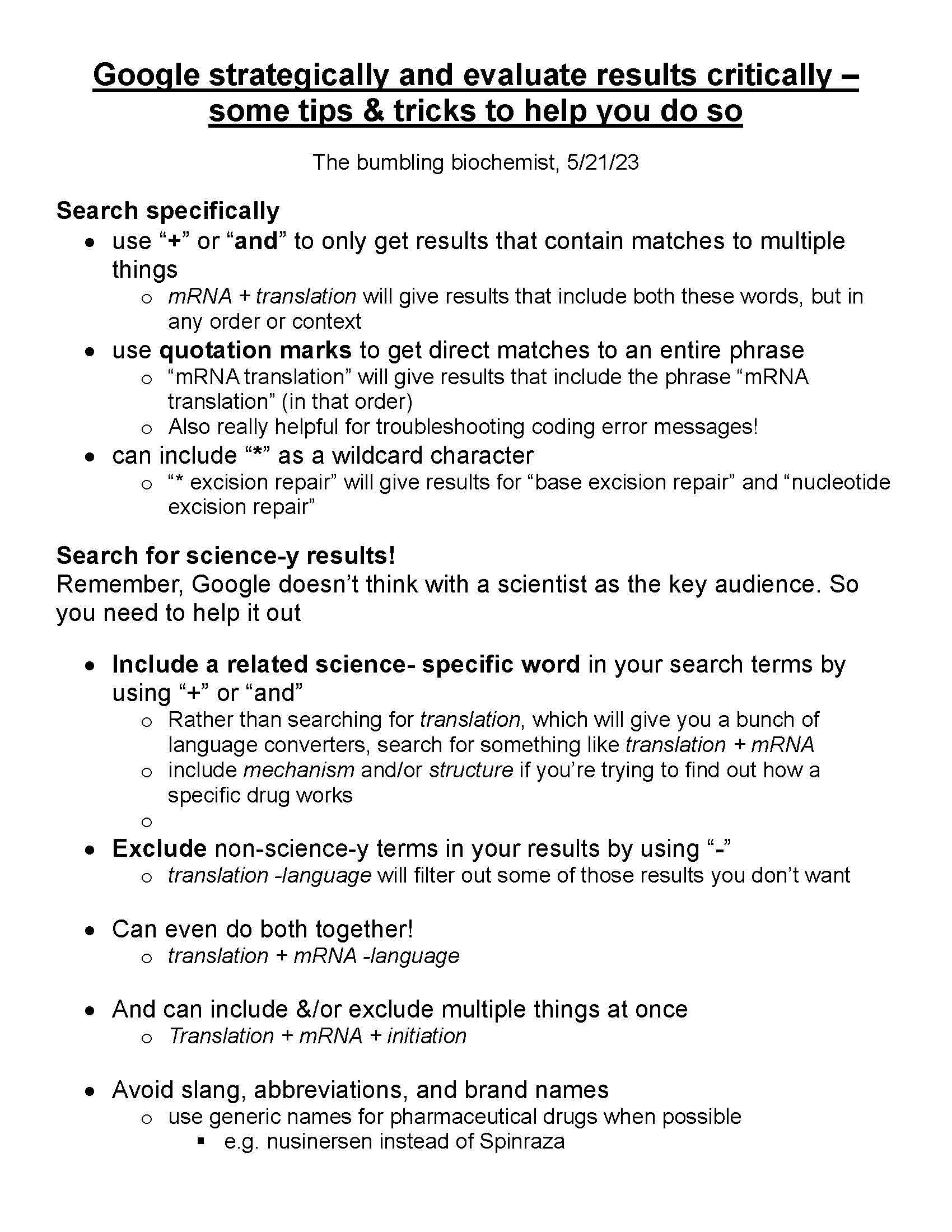
Scientists Google ALL THE TIME! Shamelessly! There’s no way we can memorize everything – and even if we could – by the time we did, there would be new things discovered to memorize! Instead, we develop strong critical thinking skills as well as a firm foundation in scientific fundamentals, and then we Google the details! As I discuss at the end, Google is no replacement for a good education, but it is a valuable tool to help you take advantage of that education. So, here are some tips & tricks to help you Google strategically to find the results you’re looking for & evaluate the results you find critically.
Search specifically
- use “+” or “and” to only get results that contain matches to multiple things
- mRNA + translation will give results that include both these words, but in any order or context
- use quotation marks to get direct matches to an entire phrase
- “mRNA translation” will give results that include the phrase “mRNA translation” (in that order)
- Also really helpful for troubleshooting coding error messages!
- can include “*” as a wildcard character
- “* excision repair” will give results for “base excision repair” and “nucleotide excision repair”
Search for science-y results!
Remember, Google doesn’t think with a scientist as the key audience. So you need to help it out
- Include a related science- specific word in your search terms by using “+” or “and”
- Rather than searching for translation, which will give you a bunch of language converters, search for something like translation + mRNA
- include mechanism and/or structure if you’re trying to find out how a specific drug works
- Exclude non-science-y terms in your results by using “–”
- translation -language will filter out some of those results you don’t want
- Can even do both together!
- translation + mRNA -language
- And can include &/or exclude multiple things at once
- Translation + mRNA + initiation
- Avoid slang, abbreviations, and brand names
- use generic names for pharmaceutical drugs when possible
- e.g. nusinersen instead of Spinraza
- use generic names for pharmaceutical drugs when possible
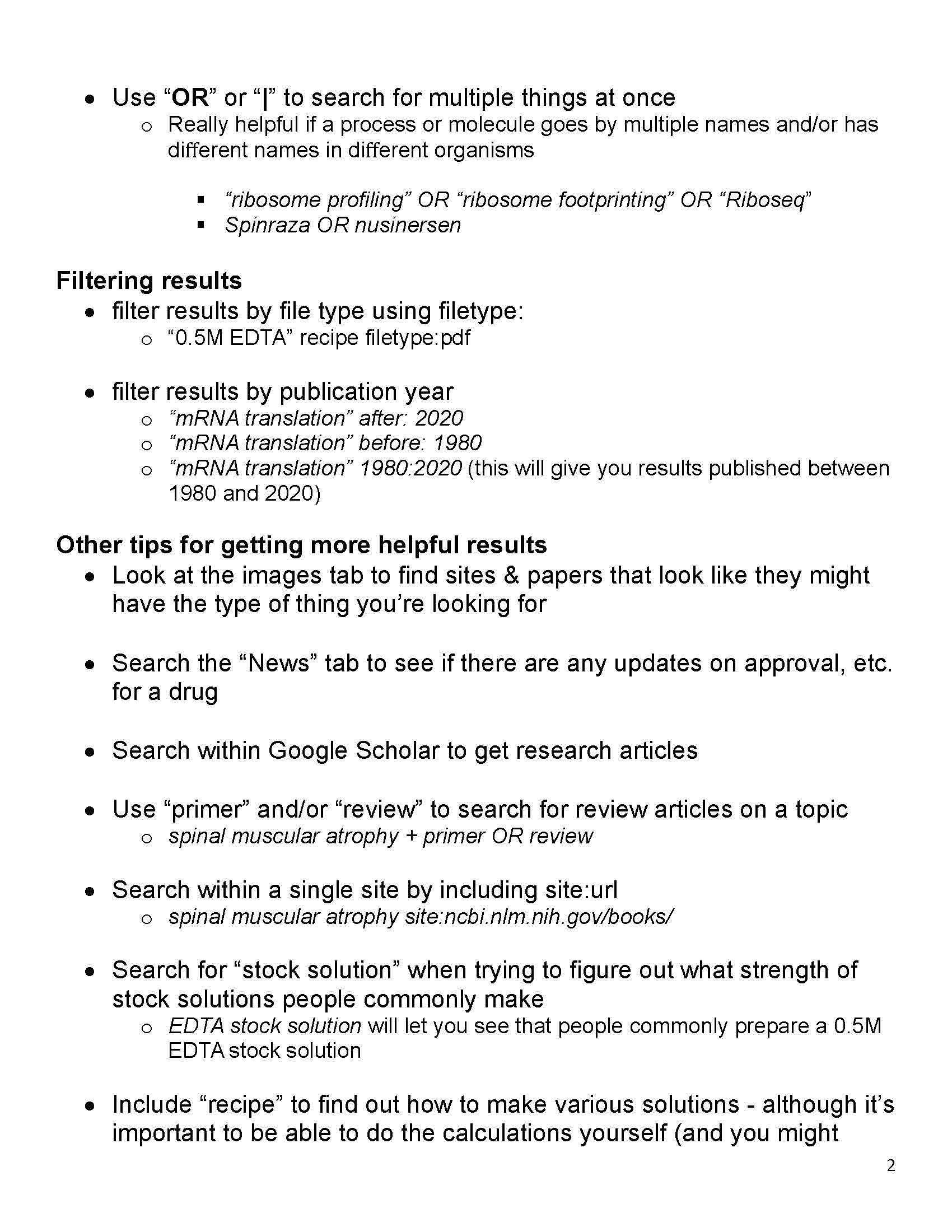
- Use “OR” or “|” to search for multiple things at once
- Really helpful if a process or molecule goes by multiple names and/or has different names in different organisms
- “ribosome profiling” OR “ribosome footprinting” OR “Riboseq”
- Spinraza OR nusinersen
- Really helpful if a process or molecule goes by multiple names and/or has different names in different organisms
Filtering results
- filter results by file type using filetype:
- “0.5M EDTA” recipe filetype:pdf
- filter results by publication year
- “mRNA translation” after: 2020
- “mRNA translation” before: 1980
- “mRNA translation” 1980:2020 (this will give you results published between 1980 and 2020)
Other tips for getting more helpful results
- Look at the images tab to find sites & papers that look like they might have the type of thing you’re looking for
- Search the “News” tab to see if there are any updates on approval, etc. for a drug
- Search within Google Scholar to get research articles
- Use “primer” and/or “review” to search for review articles on a topic
- spinal muscular atrophy + primer OR review
- Search within a single site by including site:url
- spinal muscular atrophy site:ncbi.nlm.nih.gov/books/
- Search for “stock solution” when trying to figure out what strength of stock solutions people commonly make
- EDTA stock solution will let you see that people commonly prepare a 0.5M EDTA stock solution
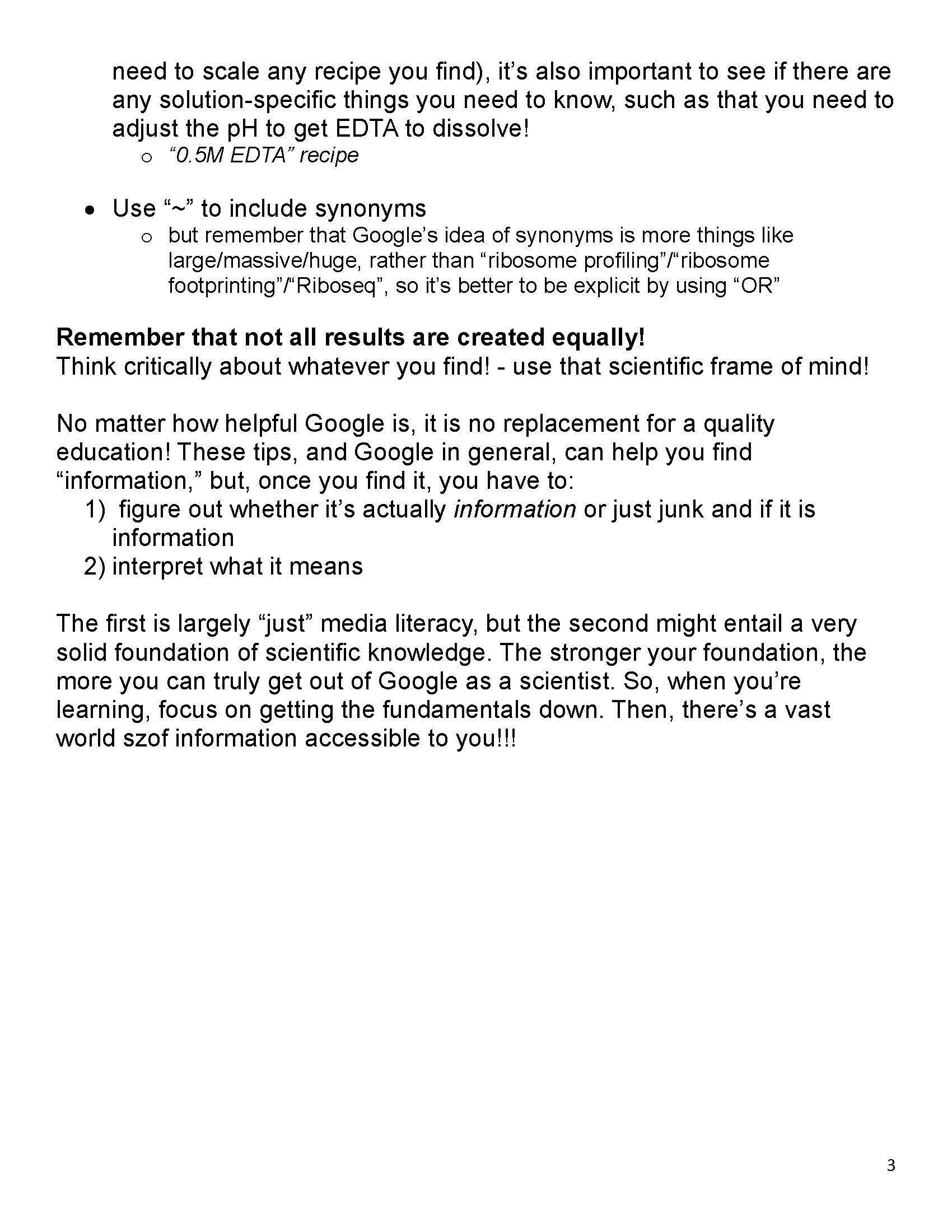
- Include “recipe” to find out how to make various solutions (although it’s good to be able to do the calculations yourself, it’s important to see if there are any solution-specific things you need to know, such as that you need to adjust the pH to get EDTA to dissolve!)
- “0.5M EDTA” recipe
- Use “~” to include synonyms
- but remember that Google’s idea of synonyms is more things like large/massive/huge, rather than “ribosome profiling”/“ribosome footprinting”/“Riboseq”, so it’s better to be explicit by using “OR”
Remember that not all results are created equally!
Think critically about whatever you find! – use that scientific frame of mind!
No matter how helpful Google is, it is no replacement for a quality education! These tips, and Google in general, can help you find “information,” but, once you find it, you have to:
- figure out whether it’s actually information or just junk and if it is information
- interpret what it means
The first is largely “just” media literacy, but the second might entail a very solid foundation of scientific knowledge. The stronger your foundation, the more you can truly get out of Google as a scientist. So, when you’re learning, focus on getting the fundamentals down. Then, there’s a vast world of information accessible to you!!!
I’ve uploaded this tips sheet to my “BB resources” Google Drive, where you’ll also find a lot of other stuff: https://bit.ly/bumbling_uploads
And here are direct links:
here’s a link to the YouTube video: https://youtu.be/Dd6Io3MMn54
Here are some helpful resources I found with other tips for a wider variety of searches:
- “40+ Google Search Hacks, Tricks & Tips for 2023”, Christian Eilers, CPRW; Zety, updated 12/13/22 https://zety.com/blog/google-search-hacks
- “20 Google Search Tips to Use Google More Efficiently”, Joseph Hindy; LifeHack, last updated 1/19/23 https://www.lifehack.org/articles/technology/20-tips-use-google-search-efficiently.html
- “36 Google Search tricks to find exactly what you’re looking for: Get the info you want without ever clicking into a new site.” By Jessica Lau, Zapier, March 30, 2023 https://zapier.com/blog/advanced-google-search-tricks/
P.S. If you’re curious about Spinraza/nusinersen, check out: https://bit.ly/spinrazasma ; YouTube: https://youtu.be/sK9NldpQC-M